


Night Owl Protect
4.66.59K Reviews
App Specs
- Version
- 1.6.28
- Updated On
- License
- Free
- Downloads
- 1,000,000+
- Developer
- Night Owl Sp LLC
- Categories
- House & Home
- Platform
- Android, iOS
Screenshots
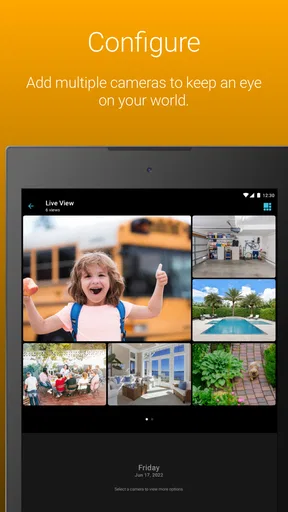
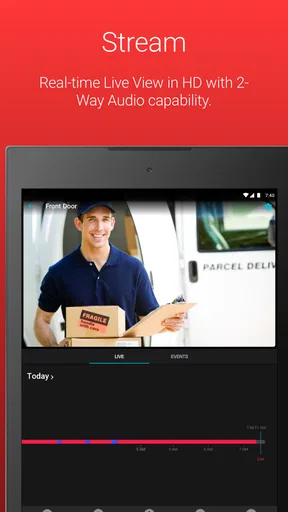
 Analysis by AppCompare
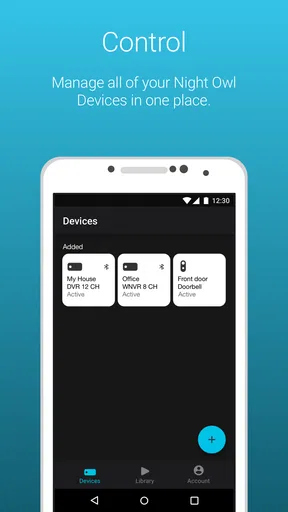
For me, a home-security app is only useful if checking it becomes a simple habit rather than another chore. Night Owl Protect is designed to connect a phone with a Night Owl camera system, so its value depends on having compatible equipment and a reason to check in while away. I find that focus helpful: instead of treating it as a general smart-home dashboard, I use it as a place to view cameras, respond to alerts, and look back at recorded activity.
A routine that starts with a quick check
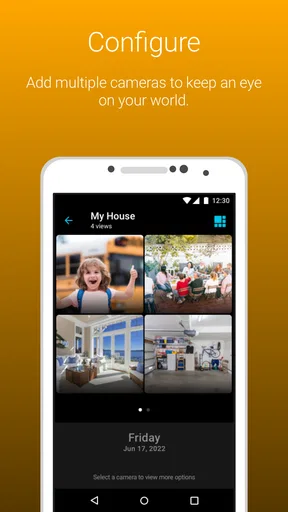
My most practical way to use a camera app is to make each check purposeful. Before leaving home, I would confirm that the cameras I rely on are visible in the app; later, I can open a live view if I need to see what is happening. That is more useful than repeatedly opening the app without a question in mind. For example, when a delivery is expected, I can check the relevant view around the time it arrives and use past footage if I missed the moment.
That kind of routine also helps set realistic expectations. A camera view can help me understand what is happening in a particular area, but it is not the same as being physically present or checking every part of a property. I would choose camera positions around the specific questions I want answered—such as whether a package is at the door or whether a room appears occupied—rather than assume one camera view covers everything.
Make alerts useful, not constant
Notification settings deserve a little thought before relying on them. I would begin with the alerts that matter most, then adjust if ordinary movement creates too many interruptions. A notification is useful when it prompts a sensible action; a stream of low-value alerts can train me to ignore the phone, which defeats the point. If the app allows different alert choices for the cameras in a system, tailoring them to each camera’s role is a better approach than treating every view the same.
There is a practical trade-off here: fewer alerts can make daily phone use calmer, but may mean I notice some activity later. I would review the settings after living with them for a while, especially if a camera faces an area with frequent expected movement. I also would not depend on a notification alone as proof that an event did or did not happen. For something important, opening the relevant camera view or reviewing footage is the more deliberate check.
Reviewing footage with a question in mind
When I look back through recordings, I get more from the timeline if I first narrow down what I am trying to find. A delivery, a visitor, or a particular time of day gives me a useful starting point; scrolling without a clue can turn a quick check into a frustrating search. If I am checking a package, for instance, I would focus on the camera aimed at the entrance and move through the likely window rather than inspect every camera in turn.
That workflow is useful for ordinary household questions, but it is not a substitute for a carefully maintained archive. I would check that the system is recording as expected and learn where its playback controls are before an urgent moment arises. I would also avoid assuming that footage will always be available indefinitely: the practical amount of history depends on the camera system and its setup, so the app is best treated as a convenient way to review available recordings, not as a permanent record-keeping service.
Worth Reading Before You Choose

EA SPORTS FC Mobile 26 Is a Bigger Football Game, but It Takes Time

Flipboard Shows What News Apps Must Do Beyond the Feed

Switching to Android Auto Means Rethinking Your Driving Routine

Google Calendar Makes a Crowded Week Easier to Manage

Ludo King Makes the Most of the Minutes Between Plans

Baby Panda World Brings Quick Play to Modern Phones, but Its Game Library Feels Busy
There is another small habit worth adopting: test the complete route from alert to playback when nothing urgent is happening. Knowing how to open a camera, find a past event, and return to live viewing makes the app easier to use under pressure. It is a modest bit of preparation, but it prevents the first real use from becoming a hunt through menus.
Your Personal Security Buddy
The first thing that caught my attention with Night Owl Protect is its intuitive interface. From the moment you launch it, the app practically holds your hand through the setup process. I’m not exactly a tech whiz, but the step-by-step guide made it a breeze to connect my cameras and get everything up and running.
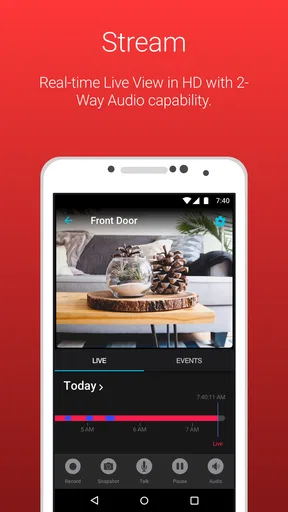
Once you've got your system connected, you can dive into a range of features. One of my favorites is the live streaming capability. Whether I'm at the office or chilling at a café, I can pop open the app and instantly see what’s happening at home. It’s like having a window into my living room, and honestly, it’s pretty cool.
Keeping You in the Loop
Notifications are a big deal when it comes to security apps, and Night Owl Protect doesn’t disappoint. You can customize alerts so you're only notified about the things that matter most to you. Whether it’s motion detection or camera tampering, you’ll get a heads-up via push notifications. I found it particularly handy to tweak when and how I receive alerts. This way, my phone isn’t buzzing like crazy, but I’m still in the know.
The app also lets you review past footage with ease. The timeline feature is like a mini time-travel machine, letting you skip through past events at your convenience. I’ve used it a couple of times to check on package deliveries, making sure everything's right where it should be.
Settings that deserve a second look
Before I rely on a security setup, I take a few minutes to check the phone itself as well as the app. Push notifications need to be allowed at the operating-system level, and the phone’s quiet or focus settings can affect when I notice them. I also make sure the app is signed in to the account associated with the camera system. These are simple checks, but they are easy to overlook when an alert does not arrive as expected.
I would also consider who else needs access before sharing a login or handing over a phone. A household may have different needs from a small workplace: one person might want to check a delivery, while another should be responsible for deciding how to respond to an alert. Keeping access intentional is a useful privacy habit, especially when cameras cover shared spaces. I would avoid pointing cameras somewhere people reasonably expect privacy.
For a smoother everyday routine, I keep the app easy to reach on my phone and use it for specific checks rather than as a background distraction. A quick look at the entrance when a delivery is due is different from monitoring a live stream all afternoon. The first has a clear purpose; the second can drain attention without adding much reassurance. This distinction matters because a security app works best as one part of a sensible home routine, not as a replacement for every other precaution.
Faster patterns, with realistic expectations
Experienced users can save time by making the same decisions repeatable: identify which camera answers which question, keep alert choices aligned with that purpose, and use a known time window when reviewing an event. If I am checking whether a visitor arrived, I do not need to inspect every view or replay an entire day. I start with the camera that covers the entrance and the period when the visit was expected. This is not a hidden shortcut; it is a practical way to use the controls the app already provides.
Live viewing and reviewing recorded footage serve different needs. Live view helps when I want to know what is happening now, while playback is better for reconstructing something I missed. If a live stream does not load promptly, I would check the phone’s connection and try again rather than assume the camera has stopped working. A camera system depends on more than the app alone, so troubleshooting should include the camera setup and the network as well as the phone.
The app is most appealing to people who already use Night Owl cameras and want a direct phone-based way to check them. It may also suit someone who is comfortable with a focused security tool and prefers camera viewing and alerts over a broad smart-home control center. On the other hand, if you do not own compatible Night Owl equipment, this is not a standalone way to turn a phone into a home camera. If your main aim is to manage devices from several brands in one place, a wider smart-home platform may be a better fit.
Compared with checking a camera system only at its recorder or monitor, the phone app offers the convenience of checking in while away and responding to notifications. Compared with a general home-monitoring or smart-home app, its appeal is more specific to the Night Owl camera setup. That focus can make the experience straightforward for an existing owner, but it also means the choice of camera system matters more than the app alone. I would decide first whether the equipment fits the property and the way I want to monitor it, then judge the app as its companion.
User-Friendly and Reliable
One thing I always look for in an app is reliability, and Night Owl Protect has been rock solid. The connection between my phone and the cameras has been consistently stable, ensuring smooth streaming and no frustrating drop-offs. Plus, the app’s design is clean and straightforward, making navigation simple and stress-free.
If you're someone who values privacy (and who doesn’t?), you'll appreciate the app’s security features. Night Owl has implemented robust measures to keep your data safe, which is a big plus in my book.
Who will get the most from it
Night Owl Protect is a sensible choice for a household that wants to check its Night Owl cameras while away, review a recording after a delivery, or receive selected alerts without sitting in front of a monitor. A small business owner who wants a quick look at a camera-covered area may find the same workflow useful, provided the installed system suits the job. In both cases, the value comes from having the relevant camera views and using them with a clear purpose.
I would look elsewhere if I wanted a camera app that works independently of Night Owl equipment, or if I expected one app to organize a mixed collection of cameras from many manufacturers. I would also be cautious about relying on a phone notification as the only response to a serious concern. Notifications are helpful prompts, but the right response depends on the situation and the reliability of the whole camera and network setup.
At the time of writing, the app is free, is rated for Everyone, and is published by Night Owl Sp LLC. It has an average rating of 4.5 from around 24,000 ratings, with roughly 6,400 written reviews and more than a million installs. Its release date was March 19, 2020, and version 1.6.11 requires Android 8.0 or later. Those figures suggest a well-used companion app, though popularity cannot tell me whether a particular camera system will suit a particular home.
Wrapping It Up
All in all, Night Owl Protect offers a comprehensive solution for anyone looking to up their security game. With its user-friendly design, reliable performance, and customizable features, it’s a solid choice for both tech newbies and seasoned users alike. If you’re in the market for a security app that fits seamlessly into your lifestyle, this might just be the one for you.
So, why not give it a try? You can find the download links right here on our site. Dive in, and let Night Owl Protect give you the peace of mind you deserve.
A practical verdict after the daily checks
My recommendation is conditional rather than universal: if you already have a Night Owl camera setup and want a straightforward way to view it, receive selected alerts, and check available footage, this app makes sense to try. I would set it up, confirm that the cameras and notifications behave as expected, and build a small routine around the checks that matter. If you are still choosing equipment, compare the camera system and its coverage first instead of choosing on the strength of the phone app alone.
The best result comes from treating the app as a useful companion, not a guarantee that nothing can go wrong. Keep alerts manageable, know how to find playback, and use a camera view to answer a specific question. With those habits, Night Owl Protect can make checking a home or work space more convenient without demanding constant attention. If that is the job you need it to do, I think it is a practical option; if you need a device-independent or multi-brand control hub, I would choose a different kind of app.
Pros
- User-friendly interface simplifies navigation.
- Real-time alerts ensure quick responses.
- Customizable settings for personalized use.
- High-quality video streaming enhances security.
- Easy integration with various smart devices.
Cons
- Initial setup may be confusing for beginners.
- Occasional connectivity issues reported.
- Limited features in the free version.
- Requires a stable internet connection.
- Some features may drain battery quickly.
FAQs for Night Owl Protect
What is Night Owl Protect and what features does it offer?
Night Owl Protect is a security app designed to work with Night Owl security systems. It offers features such as real-time video monitoring, motion alerts, and remote access to camera feeds. Users can also review recorded footage and customize their alert settings for enhanced security. The app is compatible with both Android and iOS devices.
Is Night Owl Protect easy to set up and use for beginners?
Yes, Night Owl Protect is designed with user-friendliness in mind. The setup process is straightforward, with clear instructions provided in the app. Once installed, the intuitive interface allows users to easily navigate through features, manage alerts, and access live feeds, making it suitable for both beginners and tech-savvy users.
Does Night Owl Protect require a subscription or additional fees?
Night Owl Protect itself does not require a subscription fee for basic features. However, some advanced features or cloud storage options might incur additional costs. It's important to check the app’s terms of service or Night Owl's website for any potential fees related to specific features or storage plans.
What devices are compatible with Night Owl Protect?
Night Owl Protect is compatible with Android and iOS devices, ensuring broad accessibility. It supports a wide range of Night Owl security systems, but it's advisable to verify compatibility with your specific model before downloading the app. This information can typically be found on the Night Owl website or app store listing.
How secure is Night Owl Protect in terms of data privacy?
Night Owl Protect prioritizes user security and data privacy. The app employs encryption protocols to protect video feeds and personal data. Users are encouraged to regularly update the app and their device's operating system to enhance security. Additionally, enabling two-factor authentication can provide an extra layer of protection for accounts.


